


Wooask | Offline translation
3.2257.00 Reviews
App Specs
- Version
- 2.2.131
- Updated On
- License
- Free
- Downloads
- 500,000+
- Developer
- shenzhen wooask technology co.,Ltd
- Categories
- Business
- Platform
- Android
Screenshots
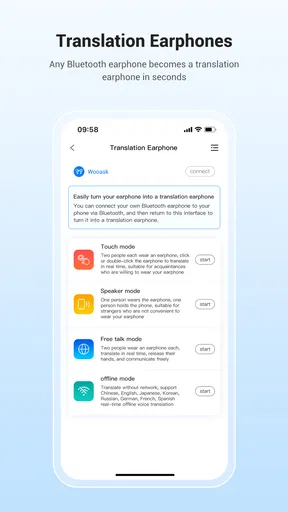
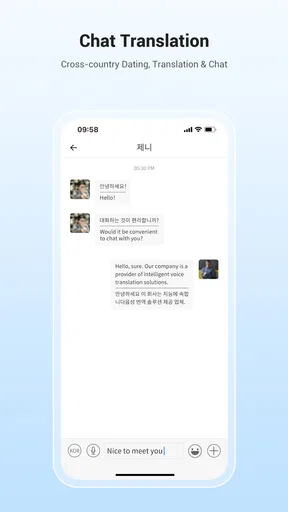
 Analysis by AppCompare
Translation apps are easy to judge when the connection is strong. The real test comes when I need to ask a question in a noisy café, check a notice while walking, or make sense of a conversation when mobile data is unreliable. Wooask | Offline translation is aimed at those moments, but I’d treat its offline promise as something to test before depending on it: the app’s performance can hinge on what has been prepared on the phone and the conditions around the conversation.
Connectivity changes what I can rely on
When I have a steady connection, a translation app can feel like a quick bridge between two languages. When I don’t, the useful question is not just whether an app is labelled for offline use, but which tasks still work and whether the languages I need are ready. I’d check Wooask at home before a trip, rather than waiting until I’m standing at a ticket counter with no signal and expecting every kind of translation to work immediately.
That small rehearsal also helps me separate a network problem from a recognition problem. If a spoken phrase fails in a busy place, I can try again somewhere quieter or type the same thought. If text translation works but voice does not, I know to change methods instead of repeating myself louder. In practice, having a fallback input matters as much as having a translation app in the first place.
A practical fit for mobile situations
Wooask is a business app from shenzhen wooask technology co.,Ltd, and its use can still make sense outside an office: travel, errands, and short face-to-face exchanges are all situations where a phone-based translator may help. I would use it for low-stakes questions such as asking where a platform is, checking what a menu item says, or confirming a simple request. Those are moments when I can pause, show the screen, and correct the wording if the first attempt is unclear.
It is less suitable as the only tool for a high-consequence conversation. A medical explanation, legal discussion, or detailed work negotiation needs more than a plausible sentence on a screen; tone, context, and specialist terms all matter. If the other person looks confused, I would switch to short, concrete phrases or seek a human interpreter rather than treating a fluent-looking result as proof that the meaning is exact.
A realistic travel routine is to prepare a few essential phrases before leaving, keep the phone accessible, and use the app for one question at a time. That reduces the pressure to deliver a long, complicated speech through a small screen. I would also keep important names, addresses, and booking details written down separately, so a translation hiccup does not become a navigation problem.
What happens when translation falters
Voice input is especially sensitive to the setting. Background music, overlapping conversation, an unfamiliar accent, or a speaker who talks quickly can make recognition less dependable. I would move closer to the speaker, reduce the sentence to one idea, and check the translated result before acting on it. If the person can read the screen, showing the translation can be clearer than playing it aloud in a crowded place.
Worth Reading Before You Choose

EA SPORTS FC Mobile 26 Is a Bigger Football Game, but It Takes Time

Flipboard Shows What News Apps Must Do Beyond the Feed

Switching to Android Auto Means Rethinking Your Driving Routine

Google Calendar Makes a Crowded Week Easier to Manage

Ludo King Makes the Most of the Minutes Between Plans

Baby Panda World Brings Quick Play to Modern Phones, but Its Game Library Feels Busy
For printed text, framing is a useful habit: isolate the words I need, hold the phone steady, and avoid trying to capture a whole crowded sign at once. A short, sharp image gives the app a better chance than a tilted photo with reflections or several blocks of text. If the result looks odd, I’d retake the image or enter the key words manually rather than trusting a guess.
These workarounds are not unique to Wooask, but they matter because translation is a chain: input, recognition, language conversion, then interpretation by another person. A weak link can change the meaning. I find it safer to ask a simple follow-up question or confirm the important detail than to assume a translation has settled the conversation.
Privacy, cost, and choosing the right alternative
For sensitive conversations, I would think carefully before speaking personal details into any translation app. I keep the input limited to what the other person needs to understand and avoid treating a phone as a private interpreter by default. That is a sensible data-conscious habit whether I’m online or offline; the connection status alone does not tell me how information is handled.
Wooask is free to install, has a Teen content rating, and includes optional in-app purchases ranging from $6.99 to $174.99 per item. I would try the basic experience first and decide whether any paid option is useful only after checking how it handles the languages and tasks I actually need. Its current version is 2.2.131, and it requires Android 6.0 or later on Android devices.
Compared with a general-purpose online translator, Wooask’s appeal is its focus on quick voice and text help in situations where connectivity may be uncertain. A browser-based translator can be a better choice when I need a familiar web workflow and have dependable data; a phrasebook is more predictable for a handful of memorized travel questions; and a human interpreter is the safer option when accuracy has serious consequences. Wooask sits between those choices, useful for flexible everyday exchanges but not a substitute for expertise.
Getting Started with Wooask
First things first, downloading the app was a breeze. It's available on both Android and iOS, so no one's missing out. Once installed, the setup was super straightforward. I was up and running in minutes, and trust me, you don’t need to be a tech wizard to get it going.
The app boasts a sleek and intuitive interface. Everything is neatly organized, making it easy to navigate. You get this welcoming vibe right off the bat, which is something I always appreciate in an app.
Features That Stand Out
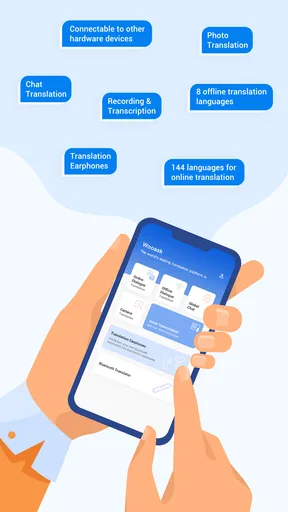
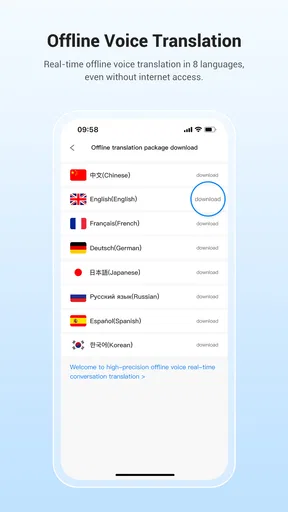
Now, let’s dive into the juicy bits. The app's offline translation feature is its crown jewel. Imagine being in a remote village with zero internet, and voilà, Wooask still has your back. You can translate text in a plethora of languages without a hitch. It's like having a personal translator in your pocket.
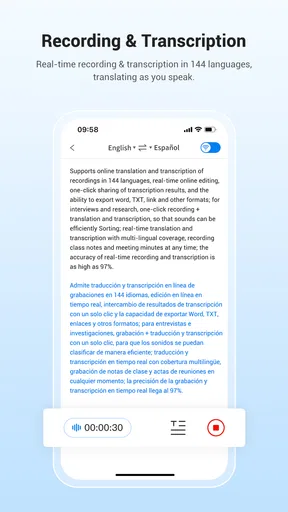
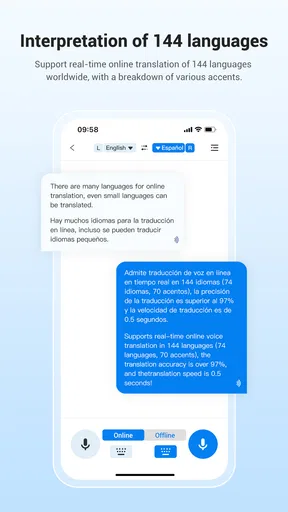
Another cool feature is voice recognition. You can speak into the app and get instant translations. I've tried it at a local restaurant, and it worked like a charm. The accuracy was impressive, and it even picked up on nuances, which is a massive plus.
Then there’s the photo translation. Just snap a pic of any text, and the app does its magic. It's perfect for translating menus, signs, or any written material you encounter on your travels.
Why It’s a Must-Have
One of the things I love about Wooask is its reliability. In situations where Wi-Fi is a rarity, it’s comforting to know you’re not stuck. Plus, the app doesn't drain your battery, which is ideal when you're out and about all day.
The app also offers regular updates, ensuring you have the latest features and language packs. It's like owning a product that keeps getting better over time. How often can you say that about an app?
Room for Improvement
No app is perfect, and Wooask is no exception. While the app performs excellently offline, some users might find the initial download size hefty due to the language packs. But hey, that's the trade-off for offline capability, right?
Also, the voice recognition, while generally spot-on, can occasionally struggle with heavy accents. It's not a deal-breaker, but something to be mindful of. I mean, even the best tech has its quirks.
Final Thoughts
Overall, Wooask | Offline translation is a nifty tool for any traveler or language enthusiast. Its ability to function seamlessly without internet is a massive win. The combination of text, voice, and photo translation makes it versatile and practical.
If you’re looking for a reliable translation app that won’t let you down when you need it the most, give Wooask a shot. It’s like having a little piece of home wherever you go. Download it, try it out, and let it become your trusty travel companion. Who knew breaking language barriers could be this easy?
Who will get the most from it
My strongest recommendation is for someone who wants a pocket aid for brief, ordinary exchanges and is willing to check the result rather than accept it blindly. A traveler with a few planned stops, a multilingual household, or someone who occasionally meets customers who speak another language may find it handy. The appeal is not that it removes every language barrier; it gives me another way to make a basic question understandable when gestures or a phrasebook are not enough.
I would be more cautious if I needed dependable interpretation every day for detailed professional work. A business label does not make the app a specialist tool, and a translation can miss a distinction that matters even when the sentence sounds natural. For recurring meetings, technical vocabulary, or negotiations, I’d use a human interpreter or a workflow built around reviewed terminology. For a quick direction or a simple request, the convenience is much easier to justify.
Make a small test part of setup
Before relying on it away from home, I’d try the exact language pair and the input method I expect to use. Test a spoken phrase, a short typed sentence, and a clear photo of printed text; then repeat one of those tests with the phone disconnected if offline use is important. This is a practical check, not a guarantee that every language or task behaves the same way. It helps me discover early whether I need a connection or another way to communicate.
I’d also keep sentences short and avoid idioms, jokes, and expressions whose meaning depends on local culture. Rather than translating “Could you possibly tell me where I might find…?”, I’d ask “Where is the bus stop?” One clear idea at a time is easier to recognize and easier for the other person to answer. For a longer exchange, I’d translate each turn separately and make sure the response answers the question I actually asked.
On a day trip, for example, I might use the camera to understand a station notice, type a destination name to avoid pronunciation trouble, and then use voice input to ask an attendant which direction to take. Those are three different tasks, and each has a sensible fallback: zoom in and type a few words if the image is unclear, show the destination on screen if speech recognition misses it, or ask the attendant to point if the translated question causes confusion. That layered approach is more dependable than expecting one feature to solve the entire journey.
How the rating fits my expectations
Wooask has a 3.2 average from around 1,400 ratings, with 257 written reviews, and it has passed 500,000 installs. I read that as a reason to keep expectations measured rather than as a verdict that it will work poorly for everyone. Translation quality can vary with the language, accent, noise, and task, so I’d judge it using the combinations I personally need. A strong result in one restaurant exchange does not guarantee the same result with a fast speaker or a complex sentence.
The app was released on December 22, 2016, and its current version is 2.2.131. For me, version details are useful mainly as a reminder to keep the app maintained and to check that it runs on my device before travel. The practical decision is still whether its everyday translation methods suit my habits, not how long the app name has been around.
Connectivity verdict
Wooask is most appealing when I want several ways to approach a small translation task and do not want a reliable internet connection to be the only plan. I would prepare it before going out, test the languages I need, and keep a written or human fallback for anything important. The free download lowers the barrier to trying it, while optional purchases mean I would check the value of any paid choice before committing.
For casual travel and brief exchanges, I’d give it a try, especially if voice, text, and camera-based translation fit the situations I face. If I need guaranteed accuracy, handle confidential details, or cannot afford a misunderstanding, I’d choose a qualified person or a more controlled process instead. That is the honest balance: Wooask can be a useful companion, but the connection, the input, and the stakes all shape how much I trust the result.
Pros
- Offline mode for translation anywhere.
- Supports multiple languages seamlessly.
- User-friendly interface design.
- Quick translation response time.
- High accuracy in language conversion.
Cons
- Limited voice translation options.
- No image translation feature.
- Occasional minor bugs in updates.
- Requires space for offline data packs.
- Limited customization for UI themes.
FAQs for Wooask | Offline translation
What is Wooask and how does it work offline?
Wooask is an offline translation app designed to help users translate languages without needing an internet connection. It uses pre-downloaded language packs to ensure translations are available anytime, anywhere. This feature is particularly useful for travelers and individuals in areas with limited connectivity.
How accurate are the translations provided by Wooask?
Wooask leverages advanced algorithms and extensive language databases to offer accurate translations. While it performs well for general communication and common phrases, users should be aware that idiomatic expressions and complex sentences may not always translate perfectly. Regular updates aim to improve accuracy continuously.
What languages are supported by Wooask?
Wooask supports a wide range of languages, including major global languages such as English, Spanish, French, Chinese, German, and many more. Users can download specific language packs as needed. The app regularly updates its language offerings to include more dialects and regional variations.
Is Wooask free to use, or does it require a subscription?
Wooask offers a free version with essential features, but certain advanced functionalities and additional language packs may require a subscription. Users can choose to subscribe for a monthly or yearly fee to access premium features and remove any limitations on language downloads.
Can Wooask be used for voice translations?
Yes, Wooask includes a voice translation feature, allowing users to speak into their device and receive translations in real-time. This is particularly handy for conversations and quick communication. However, voice recognition accuracy can vary depending on background noise and pronunciation.


